January 7, 2014 · 1 min read
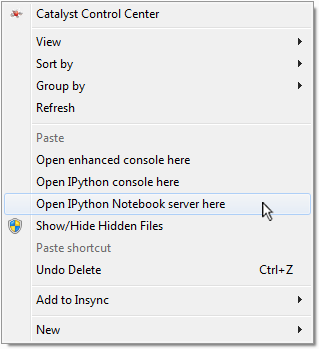
By default, the awesomely useful and fun IPython Notebook does not integrate with Windows so seamlessly. A console and then the notebook server must be opened in the proper directory in order to open a new or existing notebook. These extra steps make the IPython Notebook slightly less ideal for quickly jotting down ideas—one of its greatest uses!
Not to fear, however, as the Windows Registry can easily be modified to
- Open notebooks directly from Windows Explorer.
- Create a shortcut to launch the IPython Notebook server within the current directory.
Simply download and run ipython.reg to add the entries shown below to your registry automatically.
These entries were put together from instructions located here. A similar solution can also be found here.
Windows Registry Editor Version 5.00

[HKEY_CLASSES_ROOT\Directory\Background\shell\ipynb]
@="Open IPython Notebook server here"

[HKEY_CLASSES_ROOT\Directory\Background\shell\ipynb\command]
@="\"C:\\Python27\\Scripts\\ipython.exe\" \"notebook\" \"%V\""

[HKEY_CLASSES_ROOT\Directory\shell\ipynb]
@="Open IPython Notebook server here"

[HKEY_CLASSES_ROOT\Directory\shell\ipynb\command]
@="\"C:\\Python27\\Scripts\\ipython.exe\" \"notebook\" \"%V\""

[HKEY_CLASSES_ROOT\ipynb_auto_file\shell\open\command]
@="\"C:\\Python27\\Scripts\\ipython.exe\" \"notebook\" \"%1\""
September 13, 2013 · 2 min read
The code below shows how to use PyQt to create a status bar that shows the progress of an OpenFOAM simulation. Note that the arguments to re.findall may need to be tweaked depending on the specific case setup, and that the code assumes the simulation will be run in parallel, but it should be easy enough to tailor this sample to any case.

#!/usr/bin/env python
# -*- coding: utf-8 -*-
"""
This program creates a progress bar for an OpenFOAM simulation
Based on https://acaciaecho.wordpress.com/2011/01/11/pyqtprogressbar/

Put this file in your case folder and run from a terminal
"""
import re
import os
import time
import numpy as np
from PyQt4 import QtCore, QtGui


def getParams():
    """Get run parameters"""
    f = open("system/controlDict", "r")
    for line in f.readlines():
        if "endTime" in line:
            endTime = re.findall("\d.\d+", line)
            if endTime == []:
                endTime = re.findall("\d+", line)
        if "writeInterval" in line:
            writeInterval = re.findall("\d.\d+", line)
    f.close()
    endTime = endTime[0]
    writeInterval = writeInterval[0]
    return endTime, writeInterval


class Progress(QtCore.QThread):
    procDone = QtCore.pyqtSignal(bool)
    partDone = QtCore.pyqtSignal(int)

    def run(self):
        endTime, writeInterval = getParams()
        done = False

        while not done:
            # Find highest valued folder in "processor0" folder
            if os.path.isdir(endTime):
                done = True
                self.partDone.emit(100)
            else:
                dirs = os.listdir("processor0")
                numdirs = np.array([])
                for d in dirs:
                    try:
                        numdirs = np.append(numdirs, float(d))
                    except ValueError:
                        pass
                self.partDone.emit(int(np.max(numdirs)/float(endTime)*100))
            time.sleep(1)
        self.procDone.emit(True)


class AddProgresWin(QtGui.QWidget):
    def __init__(self, parent=None):
        super(AddProgresWin, self).__init__(parent)

        self.thread = Progress()
        self.nameLine = QtGui.QLineEdit()

        self.progressbar = QtGui.QProgressBar()
        self.progressbar.setMinimum(1)
        self.progressbar.setMaximum(100)
        self.progressbar.setFixedWidth(400)

        mainLayout = QtGui.QGridLayout()
        mainLayout.addWidget(self.progressbar, 0, 0)

        self.setLayout(mainLayout)
        self.setWindowTitle("Solving")

        self.thread.partDone.connect(self.updatePBar)
        self.thread.procDone.connect(self.fin)
        self.thread.start()

    def updatePBar(self, val):
        self.progressbar.setValue(val)

    def fin(self):
        sys.exit()


if __name__ == '__main__':
    import sys
    app = QtGui.QApplication(sys.path)

    pbarwin = AddProgresWin()
    pbarwin.show()
    app.exec_()